
1 min readOleksii Buhaiov
How to Use AI to Manage Your Time and Work in 2026: What the Research Actually Shows
What the research says about AI and your working time in 2026 — why per-task claims of 80% shrink to 2–3% of the week, which tasks it speeds up and which it slows, who gains most, and the checking time every headline leaves out.
- ai-productivity
- time-management
- knowledge-work
- generative-ai
- research
On this page

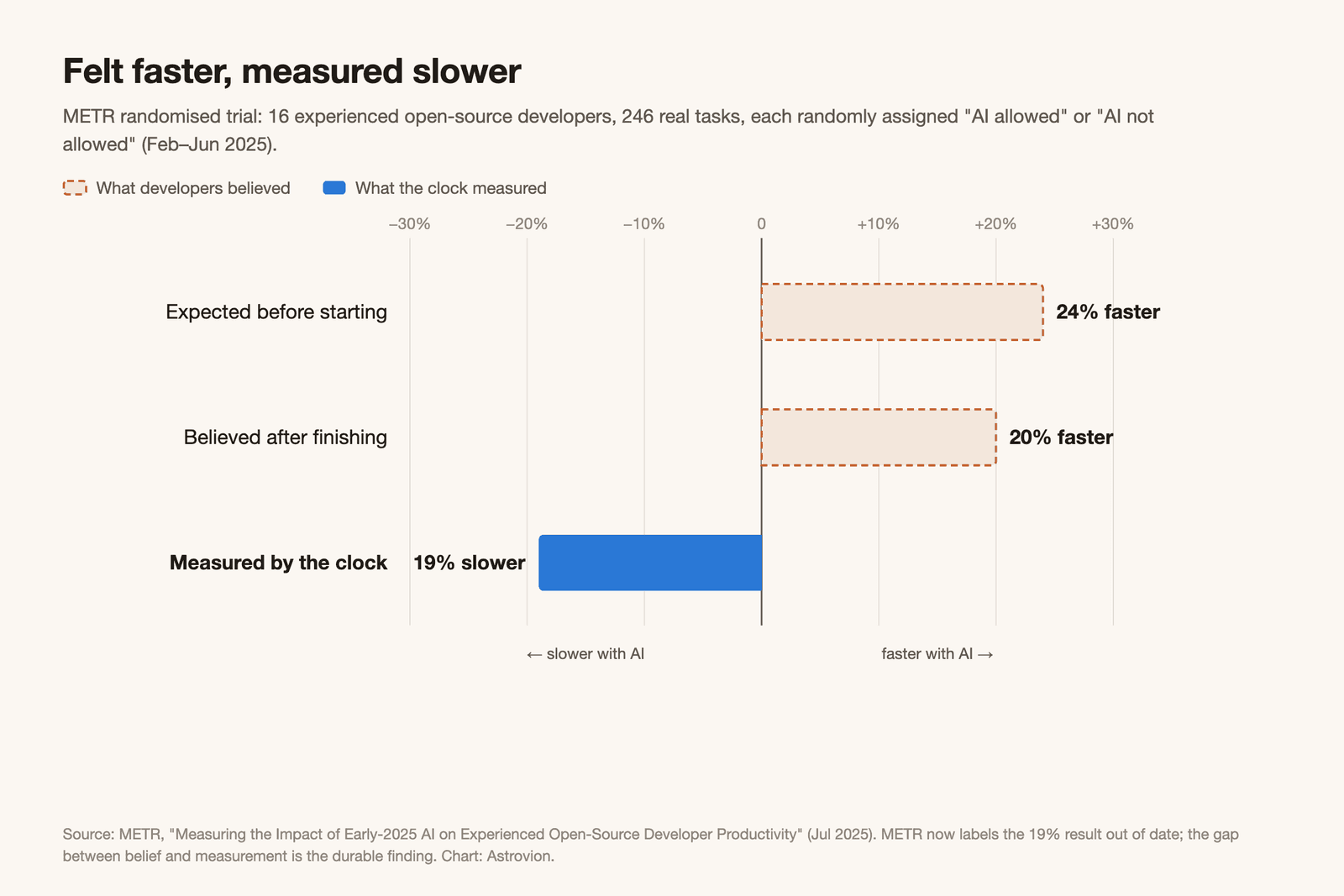
In early 2025, the AI research non-profit METR ran a randomised trial with sixteen experienced open-source developers. Each of their 246 real tasks was randomly assigned: AI tools allowed, or not. Before they started, the developers expected AI to make them 24% faster. After they finished, they still believed it had made them 20% faster. The clock said they had taken 19% longer.
METR now labels that result out of date — the tools have improved, and its larger 2026 re-run could not produce a figure it trusts. But what aged was the 19%. Nothing since has overturned the other half of the finding: people who had just been slowed down by AI were confident it had sped them up. In METR's words, anecdotal estimates of speed-up "can be very inaccurate."
That is the rule to carry through the rest of this article: your sense of how much time AI saves you is the least reliable instrument you own. Measure the task, not the feeling.
Where these numbers come from
Most of the evidence here is published research: two randomised experiments, a peer-reviewed field study, a Danish study linked to national earnings records, two UK government evaluations and a Federal Reserve survey. Three sources come from companies that sell AI or the tools around it — Anthropic, Microsoft and BetterUp — and we flag them where they appear. Full list at the end.
The honest headline answer
AI saves real time on a narrow set of tasks — drafting, summarising, finding and pulling information together. On others it saves nothing or costs time. Across a whole working week, the best population-wide data put the saving at roughly 2–3% of work hours.
Two large, independent surveys land in the same place. Anders Humlum and Emilie Vestergaard surveyed about 25,000 Danish workers in eleven occupations exposed to AI chatbots: users reported saving 2.8% of their work hours, about 25 minutes on the days they used the tools. The Federal Reserve Bank of St. Louis's adoption tracker, built by Alexander Bick, Adam Blandin and David Deming, puts time saved at 2.2% of US work hours in mid-2026, up from 1.6% two years earlier, with 39% of employed adults now using generative AI at work in a given week.
On a 40-hour week — our assumption — that is somewhere around 50 to 70 minutes. Useful. Not transformative. And both figures are self-reported, which after METR should make you read them as a ceiling rather than a floor.
The Danish study adds the harder test. Humlum and Vestergaard linked their survey to national payroll records and found no change in earnings or recorded hours in any occupation, with confidence intervals ruling out effects larger than 1%. Whatever time AI saved, it had not yet shown up anywhere a payroll system could see it.
Now compare that with the number you have probably seen quoted: AI makes tasks about 80% faster. That comes from Anthropic, which sampled 100,000 conversations on Claude.ai and had Claude estimate how long each task would take with and without it. Both numbers can be true at once. One is per task, for the tasks people choose to bring to AI; the other is the whole week. Anthropic says as much itself — people bring Claude the tasks "they think Claude will be most useful" for.
Same question, four ways of measuring it
Here is the comparison we could not find anywhere else: the major studies of AI and working time, ordered by how they measured, from furthest to closest to a stopwatch. The grouping and ordering are ours.
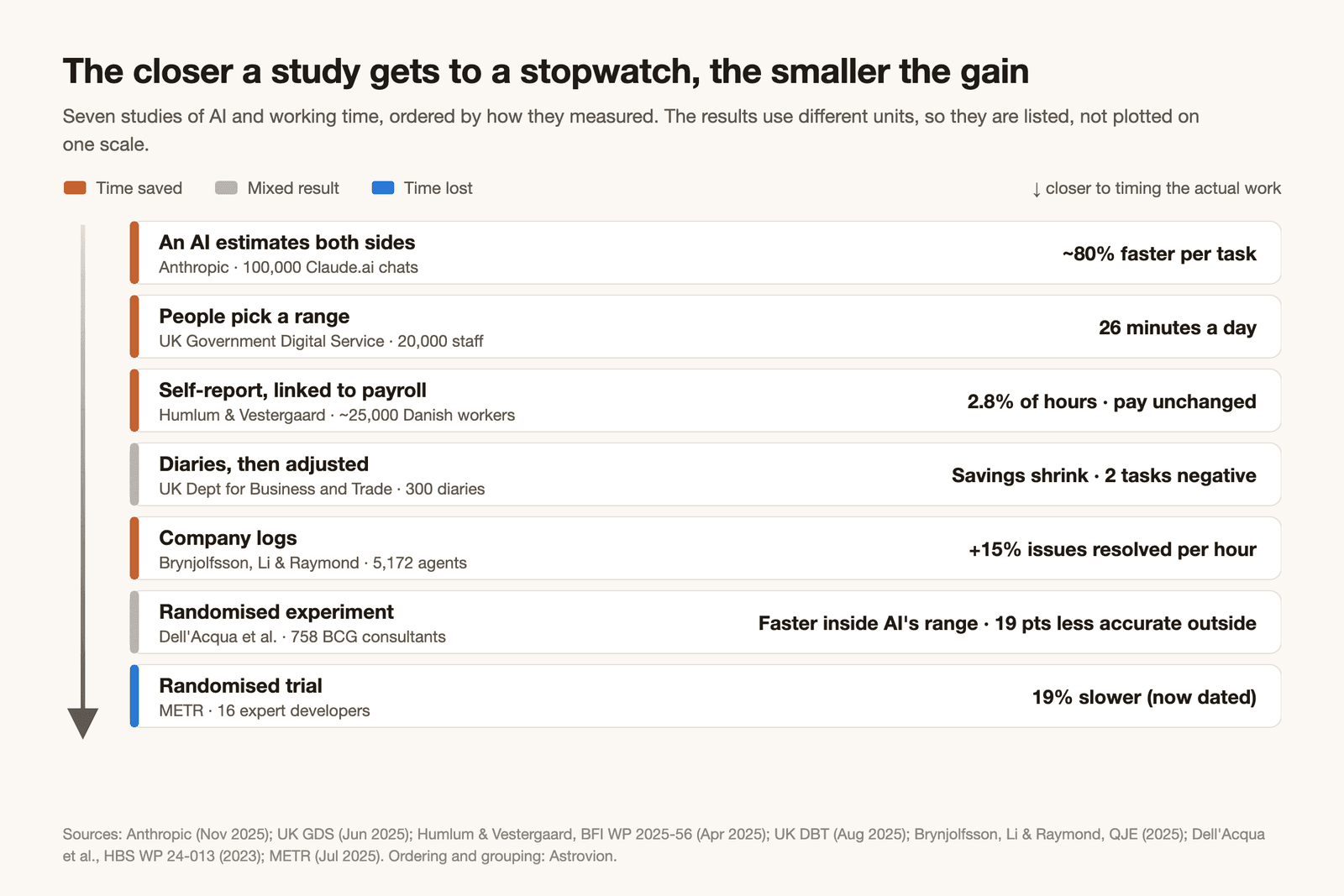
| How the time was measured | Study | What it found | What it leaves out |
|---|---|---|---|
| An AI estimates both sides | Anthropic, 100,000 Claude.ai conversations | ~80% faster per task | Time spent checking and finishing the output — by Anthropic's own caveat |
| People pick a range | UK Government Digital Service, 20,000 civil servants using Microsoft 365 Copilot | 26 minutes a day | Any control group; where the saved time went |
| People report, then linked to payroll | Humlum & Vestergaard, ~25,000 Danish workers | 2.8% of hours saved; no change in pay or hours | Direct observation of the work |
| Diaries, then adjusted | UK Department for Business and Trade, 300 diaries | Savings shrink sharply once unused outputs are removed; two tasks go negative | A large observed sample (only 11 timed sessions) |
| Company logs | Brynjolfsson, Li & Raymond, 5,172 support agents | 15% more issues resolved per hour | Other occupations — one firm, one job |
| Randomised experiment | Dell'Acqua et al., 758 BCG consultants | ~25% faster and ~40% better inside AI's range; 19 points less accurate just outside it | Anything after GPT-4 as of April 2023 |
| Randomised trial | METR, 16 expert developers | 19% slower, while feeling 20% faster | Current tools — METR calls it out of date |
The pattern is hard to miss: the closer a study gets to timing the actual work, the smaller and more uneven the gain.
The clearest example is the UK government's own pair of reports. The Government Digital Service's trial of Microsoft 365 Copilot across twelve departments produced the "26 minutes a day" headline — a figure participants chose from ranges such as "more than an hour", and which the report itself says is self-reported. The Department for Business and Trade, one of those twelve, ran its own evaluation. It asked staff to log tasks in diaries, then stripped out the time "saved" on outputs nobody used and on work that only existed because Copilot did. Data analysis fell from two hours saved per task to 0.6. Brainstorming fell from 2.1 hours to 0.5. Its conclusion: "We did not find robust evidence to suggest that time savings are leading to improved productivity."
Where AI actually saves you time
Fabrizio Dell'Acqua, Ethan Mollick and their co-authors gave this problem its best-known name: a jagged technological frontier. Some tasks sit inside AI's range and some sit outside it — and tasks that look equally hard can fall on opposite sides.
Their experiment with 758 Boston Consulting Group consultants shows both edges. On a product-innovation task inside the frontier, consultants using GPT-4 completed about 12% more of the work, faster, at roughly 40% higher quality as rated by human graders. On a business case built with a subtle trap in the interview notes, the control group reached the right answer 84.5% of the time. The groups with AI managed 60% and 70%.
For everyday office work, the most useful map comes from the Department for Business and Trade evaluation, because it is the only source here that adjusted its diary data and timed people doing tasks against a control group:
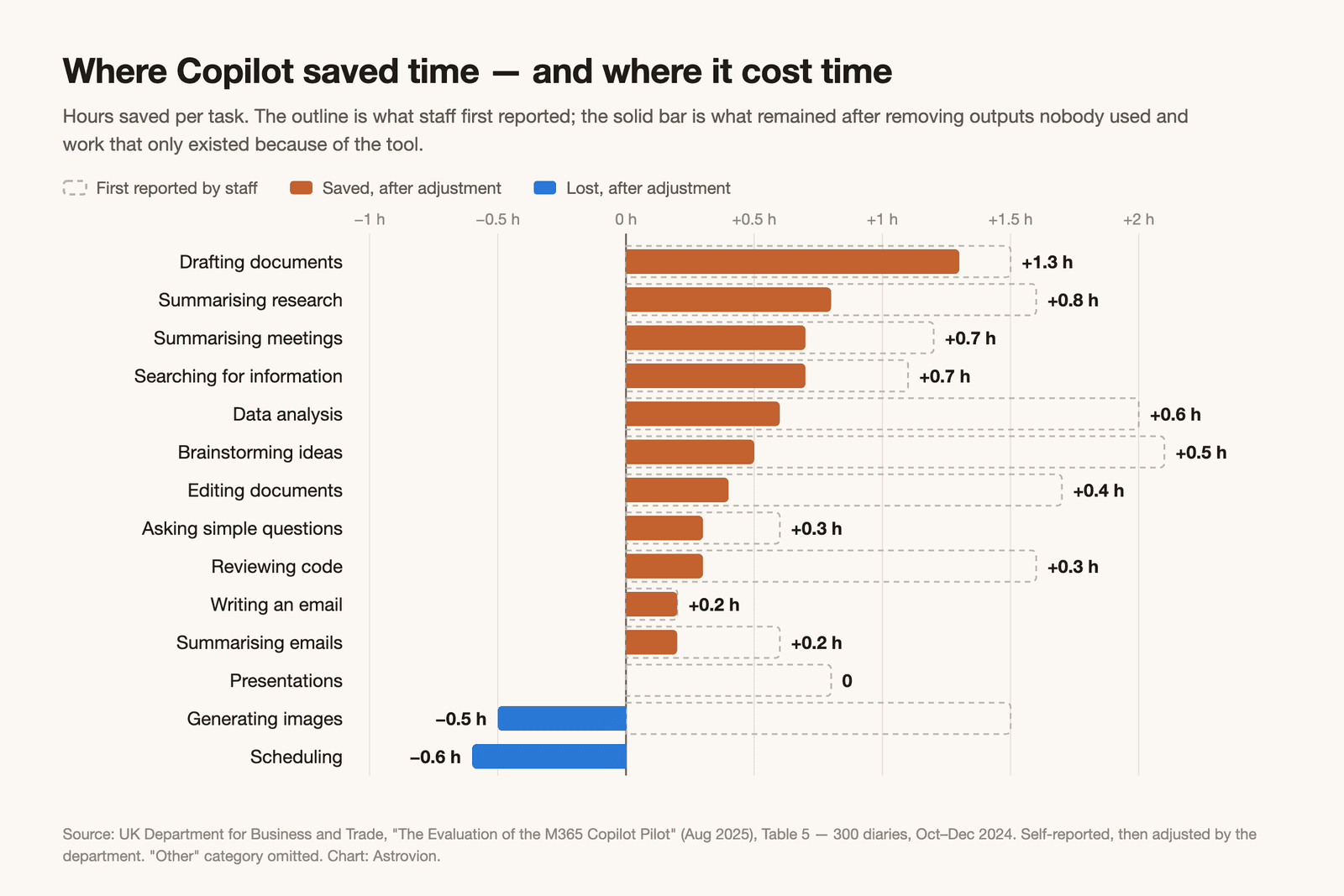
Put the diary figures together with the handful of tasks the department timed directly, and the picture looks like this:
| Task | What the evidence shows | How solid |
|---|---|---|
| Summarising reports | Observed: about 13 minutes vs 42 without Copilot, with higher accuracy and quality scores | Measured, very small sample |
| Drafting documents | 1.3 hours saved per task after adjustment — the largest | Self-reported, adjusted |
| Searching for information | 0.7 hours saved after adjustment | Self-reported, adjusted |
| Writing an email | 0.2 hours; observed at about the same time either way | Mixed |
| Presentations | 0 after adjustment; observed faster, but at lower quality and accuracy | Measured, very small sample |
| Data analysis in Excel | Observed slower (25 minutes vs 20), less accurate, lower quality | Measured, very small sample |
| Scheduling | −0.6 hours per task — it took longer | Self-reported, adjusted |
Even this table is contested. The cross-government report, drawing on the same kind of self-estimates without adjustment, credits Copilot with saving 9 minutes on scheduling and 19 minutes on presentations. The two reports do not reconcile it, and we won't either. What the department that looked more closely found is that the shape of the gain matters more than its size: big on summarising and first drafts, small on email, and negative on tasks where the tool fumbles and you clean up after it.
Anthropic's estimates show the same unevenness at larger scale: roughly 20% time saved on checking diagnostic images, roughly 95% on compiling information from reports. The frontier is jagged inside every job.
Who gains most: the novice, not the expert
The one distributional finding that two independent, measured studies agree on is that AI helps the less experienced most, and the most experienced least.
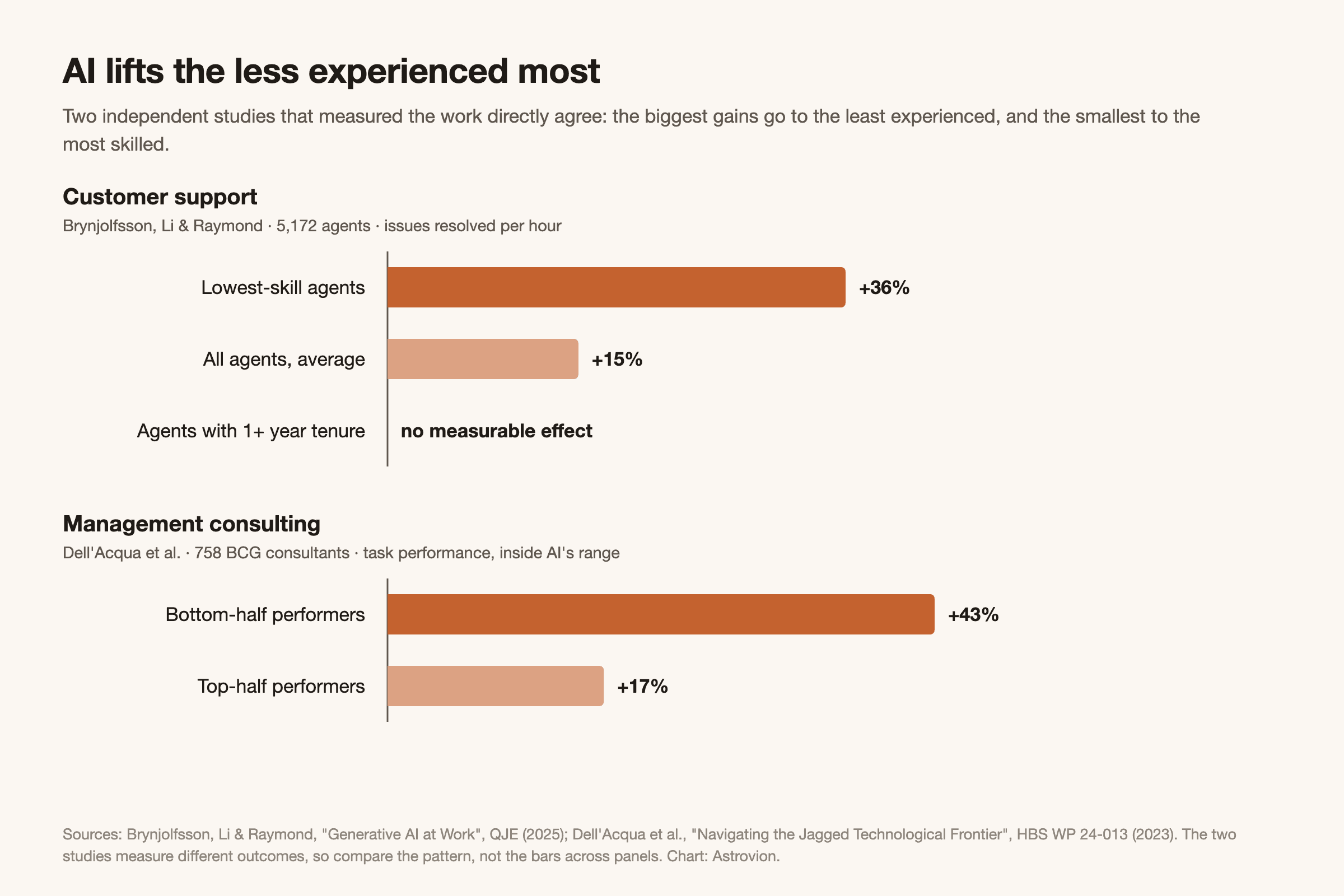
Erik Brynjolfsson, Danielle Li and Lindsey Raymond followed an AI assistant's rollout to 5,172 customer-support agents at a Fortune 500 software company, using the firm's own logs. On average, productivity rose 15%. Less skilled and less experienced agents improved by about 30%; agents with more than a year's tenure saw no measurable effect, and the top performers saw small declines in quality. New agents with two months on the job and the AI performed as well as agents with six months without it.
The BCG experiment found the same slope: consultants in the bottom half of a baseline skills test improved 43%, those in the top half 17%. And METR's slowed-down developers were the opposite of novices — experts with years of history in the codebases they were working on.
For managing your own work, this cuts two ways. The tasks where you are least experienced are where AI is most likely to help. They are also the tasks where you are least able to tell when it's wrong: in a Microsoft Research and Carnegie Mellon survey of 319 knowledge workers, 58 of them named barriers to inspecting AI responses, such as not having enough domain knowledge.
The trap: the verification tax
Every large time-saving figure in this article has the same hole in it — the time spent checking, correcting and fitting the AI's output into real work. We call it the verification tax. None of our sources uses the phrase, but several describe the thing.
Anthropic is explicit that its 80% leaves it out: it "can't account for additional time humans spend on tasks outside of their conversations with Claude, including validating the quality or accuracy of Claude's work," and says the estimates may overstate current productivity effects. The Department for Business and Trade's adjustments are, in effect, an attempt to put the tax back in — and they are why its numbers shrink. In Humlum and Vestergaard's data, 17% of chatbot users say the tools created new work for them, and reviewing AI output for accuracy is one of the new tasks they name.
The tax is easy to skip, and the evidence suggests people skip it most when they trust the tool most. Hao-Ping Lee and colleagues at Microsoft Research and Carnegie Mellon found that higher confidence in generative AI went with less critical thinking, and higher self-confidence with more — self-reported, and a correlation, not proof of cause. One participant put the mechanism plainly: "I use AI to save time and don't have much room to ponder over the result." Civil servants in the business department's pilot admitted they might not review outputs thoroughly if nobody else would see them.
Skipping the check doesn't cancel the tax. It moves it — sometimes onto the quality of the work, sometimes onto a colleague. In the BCG experiment, consultants who got the trap case wrong with AI still produced recommendations that graders rated higher in quality than the control group's. Polish is not correctness.
When the check is passed to a colleague, BetterUp and the Stanford Social Media Lab call the result workslop: AI-generated work that looks finished but isn't.
Single source — vendor survey
The workslop figures come from one online survey of US desk workers run by BetterUp — which sells coaching to fix the problem — with the Stanford Social Media Lab in September 2025. Recipients reported spending an average of 1 hour 51 minutes dealing with each piece of workslop, and estimated that 15.4% of the work they receive fits the description. BetterUp's own pages disagree on the survey's size (1,004 respondents on its blog, 1,150 on its landing page) and round the time to "2 hrs" in one place. No independent study measures it. Treat it as a direction, not a benchmark.
How to pay the verification tax on purpose
- Time the check, not just the draft. When you log how long an AI-assisted task took, stop the clock when the output is actually usable — not when the AI finishes.
- Check hardest where you're least expert. That's where AI helps most and where you'll catch the least.
- Be most suspicious of output that looks polished. On the task AI got wrong, the BCG consultants' answers were rated better.
- Don't send what you haven't read. If a colleague has to find the problem, the time wasn't saved — it was transferred.
Bottom line
Expect AI to save you real time on drafting, summarising and pulling information together — roughly an hour a week on average, more if your work is heavy on those tasks — and budget for the checking every headline figure leaves out.
Three moves that make it real:
-
Log two weeks before you trust any number, including your own. List your recurring tasks, and time a few of each with and without AI, from start to usable result. It's METR's method in miniature, and METR's finding is the reason to do it: your impression of the saving is the number most likely to be wrong.
-
Route tasks by the frontier, not by habit. Hand AI first drafts, summaries and information-gathering, where the evidence is strongest. Be wary of analysis you can't verify, scheduling, and work where you're the expert — the places measured studies found no gain or a loss.
-
Decide where the saved time goes before you save it. The UK cross-government report could not say how the time was spent; in the Danish data, 80% of users said they'd put it into other tasks. Meanwhile Microsoft's own telemetry finds its heaviest users interrupted every two minutes (single source: Microsoft Work Trend Index, June 2025 — vendor data, top 20% of users by ping volume). Twenty-six scattered minutes in a fragmented day don't add up to anything unless you book them.
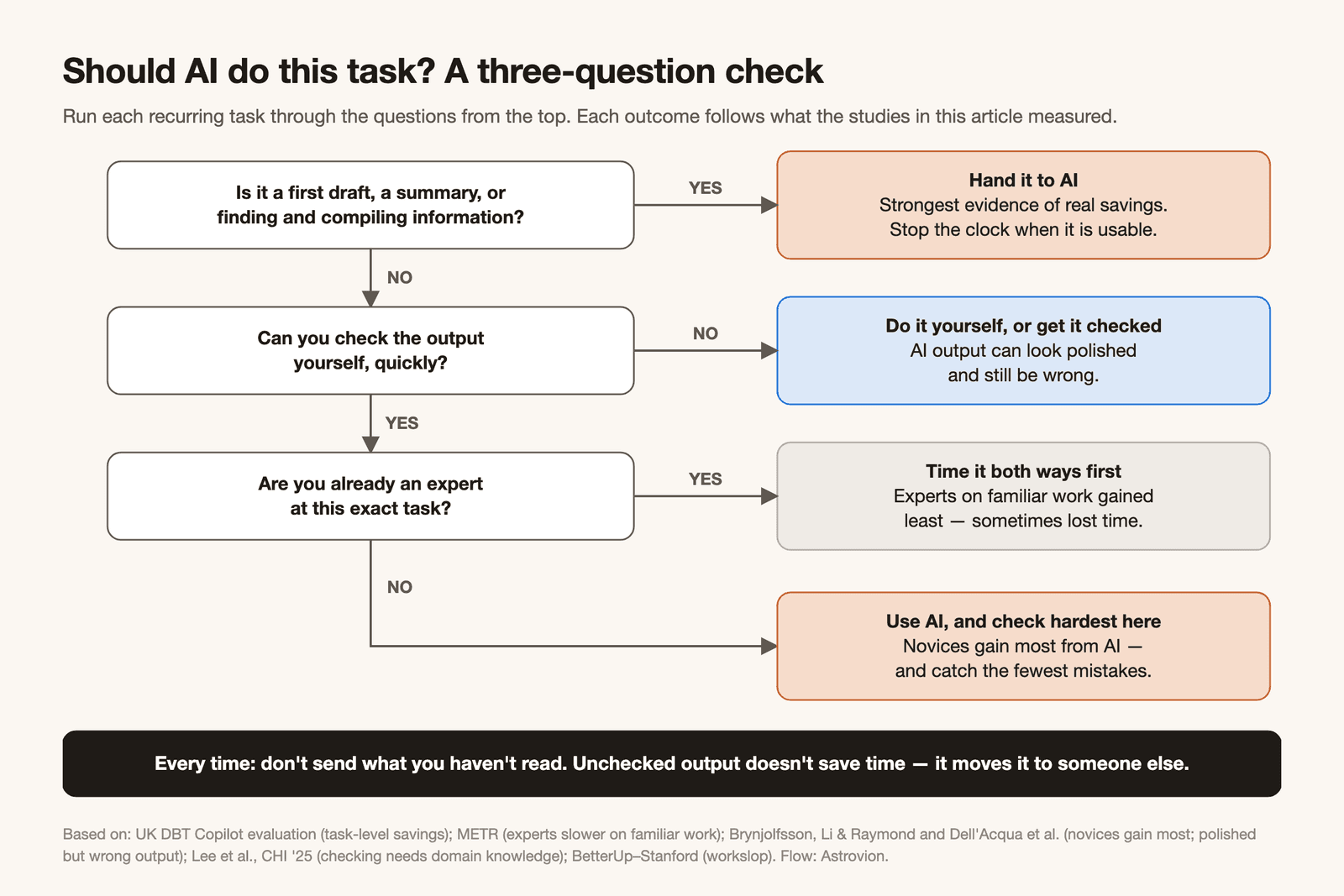
The failure mode here isn't that AI doesn't work. It's believing it saved you an hour when it cost you one — and never finding out, because you never measured.
Want to know where AI would actually save your team time, before you buy another seat or tool? We start with a paid AI workflow audit — you walk away with a map of your team's recurring tasks, each marked as inside or outside AI's range, with the checking time budgeted and a simple before-and-after timing plan to prove the result. It's yours to keep, whoever ends up building the automation. Request a consultation →

Sources
Measured and experimental studies:
- Joel Becker, Nate Rush, Beth Barnes, David Rein, METR — Measuring the Impact of Early-2025 AI on Experienced Open-Source Developer Productivity (Jul 2025)
- Joel Becker, Nate Rush, Tom Cunningham, David Rein, Khalid Mahamud, METR — We Are Changing Our Developer Productivity Experiment Design (Feb 2026)
- Fabrizio Dell'Acqua, Edward McFowland III, Ethan Mollick, Hila Lifshitz-Assaf, Katherine C. Kellogg, Saran Rajendran, Lisa Krayer, François Candelon, Karim R. Lakhani — Navigating the Jagged Technological Frontier, Harvard Business School Working Paper 24-013 (Sep 2023)
- Erik Brynjolfsson, Danielle Li, Lindsey Raymond — Generative AI at Work, Quarterly Journal of Economics 140(2) (2025)
- UK Department for Business and Trade — The Evaluation of the M365 Copilot Pilot (Aug 2025)
Surveys and population data:
- Anders Humlum, Emilie Vestergaard — Large Language Models, Small Labor Market Effects, Becker Friedman Institute Working Paper 2025-56 (Apr 2025)
- UK Government Digital Service — Microsoft 365 Copilot Experiment: Cross-Government Findings Report (Jun 2025)
- FRED Blog, Federal Reserve Bank of St. Louis — Does Generative AI Save Time at Work? (Aug 2026), charting data by Alexander Bick, Adam Blandin and David Deming
- Hao-Ping Lee, Advait Sarkar, Lev Tankelevitch, Ian Drosos, Sean Rintel, Richard Banks, Nicholas Wilson — The Impact of Generative AI on Critical Thinking, CHI '25 (Apr 2025)
Vendor-published:
- Alex Tamkin, Peter McCrory, Anthropic — Estimating AI Productivity Gains from Claude Conversations (Nov 2025)
- Marielle Leon, BetterUp — The Hidden Cost of AI "Workslop" (Sep 2025); BetterUp Labs — Workslop (survey with the Stanford Social Media Lab)
- Microsoft WorkLab — Breaking Down the Infinite Workday, Work Trend Index special report (Jun 2025)
All figures are quoted from these publications for commentary and analysis; the tables, comparisons and conclusions in this article are our own. Every image and chart was made for this article.